
A quick question from a Speakada community member turned into one of the most useful explanations we’ve ever shared — and if you’ve ever stared at your Anki home screen feeling confused, this one’s for you.
“Why Does My Anki Deck Look Like It’s Missing Cards?”
Recently, Jamie — a Speakada customer who’s been working through both the French Pronunciation Bundle and the German Pronunciation Bundle — reached out to us with a question that’s more common than you might think.
After importing her flashcard decks, Jamie looked at the Anki home screen and noticed something that didn’t quite add up. She could only see a small number of cards available to study — but she knew she’d downloaded a full deck. Had something gone wrong? Were cards missing?
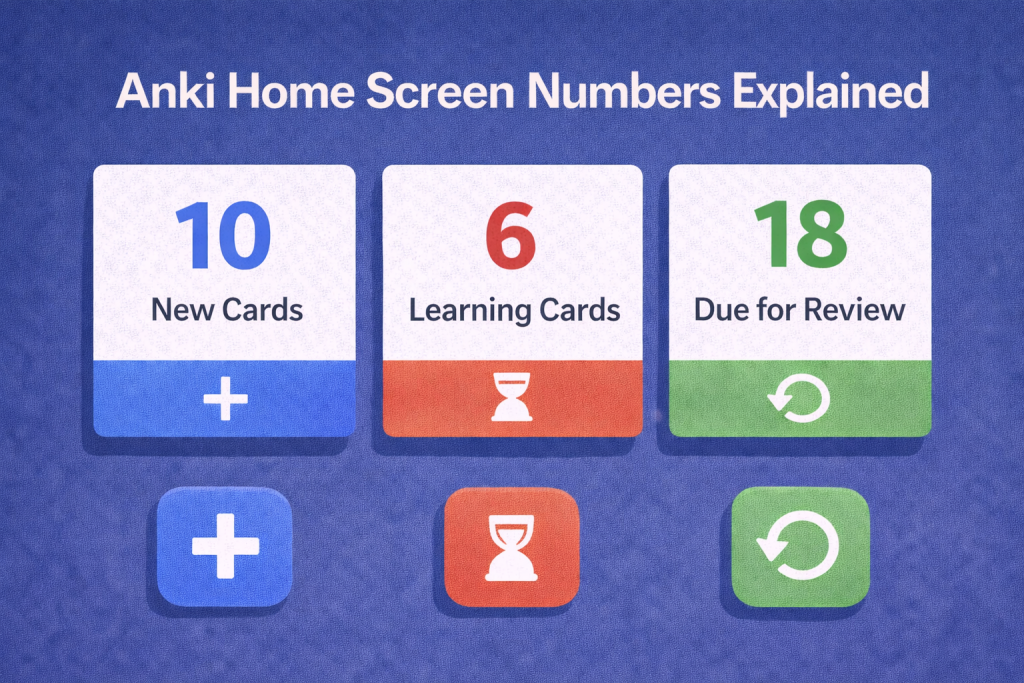
Those three colored numbers — Blue, Red, and Green — are something almost every new Anki user finds confusing at first (and if any of them are zero, they’ll just appear in gray).
If you’ve ever looked at your Anki deck list and wondered what those numbers mean, keep reading — because once you understand this, Anki will start to feel a lot less mysterious.
The Three Numbers Explained: Blue, Red, and Green
When you open Anki and look at your deck list, you’ll see three numbers displayed next to each deck. Here’s exactly what they mean:
🔵 Blue — New Cards
These are cards that haven’t been introduced to you yet. They’re fresh — you’ve never studied them in a session before. Anki introduces a limited number of new cards each day (the default is usually 20) so you’re not overwhelmed right from the start.
🔴 Red — Learning Cards
These are cards you’re actively working through right now. They’ve been shown to you at least once in your current or recent sessions, and Anki is still moving them through the short-term learning steps before they graduate to longer review intervals.
🟢 Green — Due for Review
These are cards from previous sessions that are now ready to be reviewed again. Based on how well you knew them last time, Anki has calculated the ideal moment to bring them back — just before you’re likely to forget them.
When any of these three numbers is zero, it simply appears in gray — Anki’s way of showing there’s nothing left in that category for today.

The Key Insight: These Numbers Show Today’s Study Load, Not Your Total Cards
This is the part that trips up almost everyone.
Those three numbers do not represent the total number of cards in your deck. They represent what’s available for you to study today.
Anki is built around a concept called spaced repetition — a scientifically backed learning method that schedules reviews at increasingly spaced intervals over time. The idea is simple but powerful: instead of cramming everything at once, you review each card at the exact moment it’s most effective to do so. This makes your study sessions dramatically more efficient than traditional flashcard methods or rote memorization.
Because of this design, Anki paces your learning deliberately. It won’t show you all 30, 100, or 2,000 cards on day one. It introduces a manageable batch of new cards each day, and it times your reviews strategically so that older cards come back right when you need them.
So if you’re studying the German Alphabet Flashcards and you only see 10 or 20 cards available today — that’s not a bug. That’s Anki doing exactly what it’s supposed to do.
How Jamie Confirmed Everything Was Working Fine
After our team explained the color-coding, Jamie opened the Anki browser by clicking on her deck name and then selecting “Browse.” There she could see all 30 cards in the German Alphabet deck — the standard 26 letters plus the four special German characters: Ä, Ö, Ü, and ß.
Everything had imported correctly. The remaining cards were simply queued for future days, waiting for their turn in the spaced repetition schedule.
This is the best way to verify your deck is complete: use the Anki browser. The main screen numbers are just a snapshot of today’s workload — the browser shows you the full picture.
Why This Matters for Language Learning
Understanding this mechanism isn’t just a technical curiosity — it actually changes how you approach your study sessions.
When you know that Anki is managing your review schedule behind the scenes, you can stop second-guessing the numbers and start trusting the process. Your job is simple: show up each day and work through whatever Anki puts in front of you.
This applies whether you’re working through Pronunciation Flashcards to nail the sounds of a new language, building your core lexicon with Vocabulary Flashcards, or internalizing structures with Grammar Flashcards. Anki’s spaced repetition engine works the same way across all of them.
The consistent daily habit is what makes the system work. And the system is designed to make that habit as frictionless as possible.
A Quick Tip: Adjusting Your Daily New Card Limit
If you feel like Anki isn’t introducing enough new cards each day — or conversely, if you’re feeling overwhelmed — you can adjust the daily new card limit in your deck settings.
To change it:
- Click the gear icon next to your deck name
- Select “Options”
- Under “New Cards,” adjust the “New cards/day” setting
Most language learners find that somewhere between 10 and 30 new cards per day is a sustainable pace. If you’re studying a large deck like the Spanish Top 2000 Words Flashcards or the French Top 2000 Words Flashcards, keeping a steady daily pace is far more effective than trying to sprint through everything at once.
Want to learn more about how Anki works under the hood? Check out our article on How Anki Works to Learn a Language Better and Why Anki is Good for Learning.

This Applies to All Speakada Decks — Across All Languages
Whether you’re studying with our Anki Spanish Flashcards, Anki French Flashcards, Anki Italian Flashcards, Anki German Flashcards, Anki Dutch Flashcards, Anki Polish Flashcards, or Anki English Flashcards — the same Anki logic applies across every single deck.
The blue, red, and gray numbers behave the same way regardless of which language you’re learning or which type of deck you’re using. Once you understand how these numbers work, you’re ready to use any Speakada deck with full confidence.
Have a Question? We’re Here to Help
Jamie’s question is a great reminder that even small moments of confusion are worth asking about. If you’re ever unsure about something — whether it’s how your flashcards work, which deck to start with, or how to get the most out of Anki for your specific language — just reach out. We’re always happy to help.
You can also browse the Anki Language Learning Blog for more tips and guides, or explore our full range of Anki Language Learning Flashcards to find exactly what you need for your target language.
Want More Tips Like This? Subscribe to Speakada Weekly
If you found this helpful, you’ll love Speakada Weekly — our free newsletter packed with smart language learning strategies, Anki tips, and insights to help you make faster progress with your flashcards.
It’s the kind of practical, no-fluff guidance that helps you study smarter — not just harder.
👉 Subscribe to the Speakada Newsletter here — it’s completely free, and you can unsubscribe any time.
Happy studying — and trust the process. Anki knows what it’s doing.

Make Flashcards Online to Learn Spanish Now One of the biggest challenges when learning Spanish is figuring out how to Read more
Most language learners aim for 10 Anki cards per day — but is that right for you? Discover the 3 Read more

Cloze Deletion Anki Guide - My Experience and What I Use Now In this article, I'm going to be talking Read more
Grammatical Gender and How to Learn Gender Nouns With Anki Recently we were asked a question about the use of Read more